

The Samsung Galaxy Z Fold 8 has established itself as a formidable leader in the foldable smartphone market, garnering significant praise for its robust hinge mechanism, refined software integration, and overall hardware performance. Despite its widespread acclaim, a persistent point of contention among power users and enthusiasts remains the presence of the selfie camera cutout on the primary foldable display. While the internal display offers a vast, uninterrupted canvas for media consumption and productivity, the small circular aperture—a necessary hardware compromise—remains a visible distraction for those seeking a truly immersive experience. As users seek to optimize their viewing experience, Samsung’s One UI offers a granular, often overlooked solution: the ability to mask the camera cutout with a black status bar, effectively creating a uniform bezel.
Understanding the Hardware Context
The design philosophy behind the Galaxy Z series has always prioritized screen real estate, yet the integration of front-facing cameras into foldable panels presents significant engineering challenges. Unlike traditional slab phones, where the display is static, the Z Fold 8 utilizes an Under-Display Camera (UDC) or a punch-hole setup that must balance structural integrity with aesthetic preference.
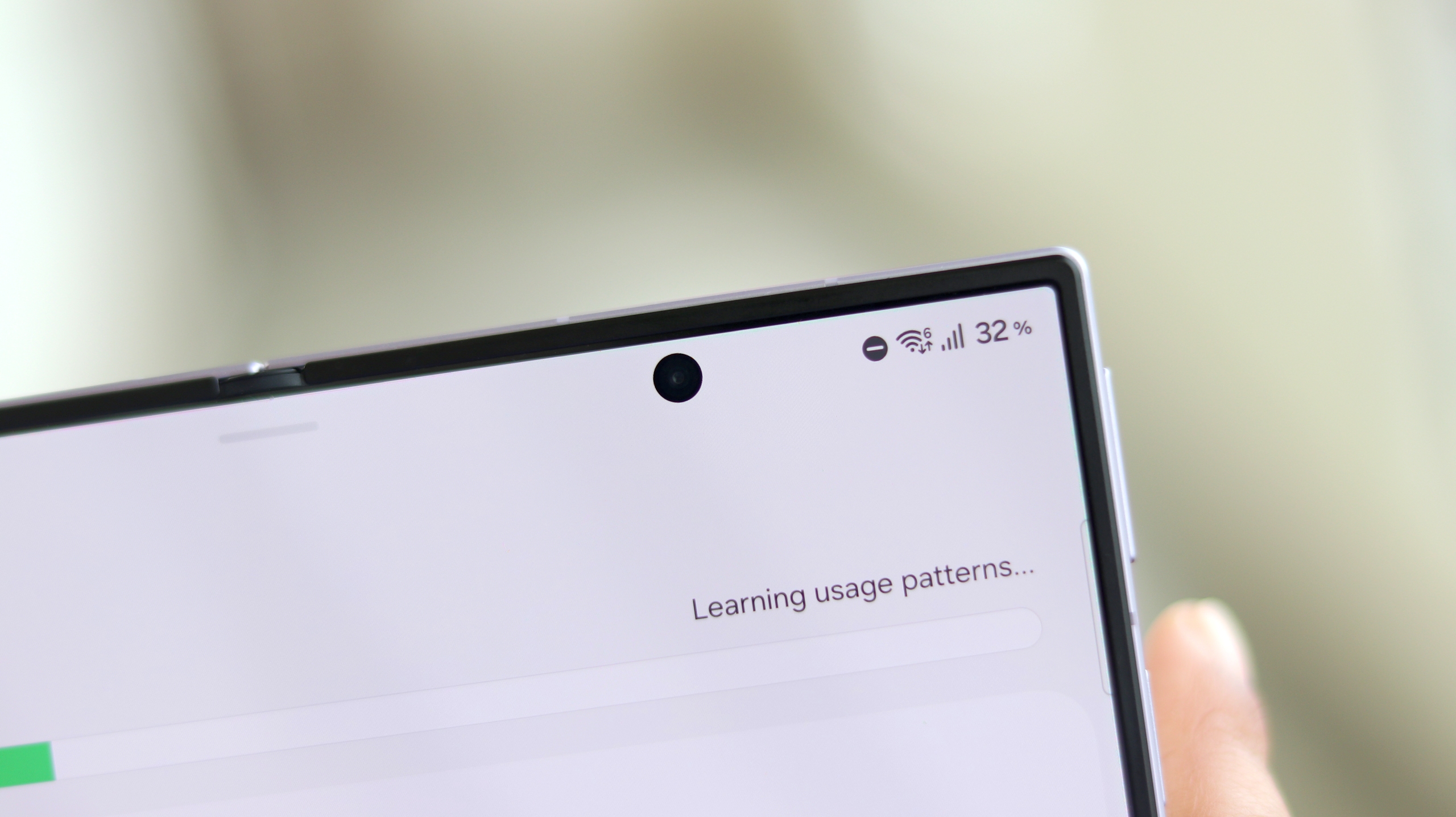
In the development cycle of the Galaxy Z Fold 8, Samsung opted to maintain a high-resolution, high-brightness panel that necessitates a standard punch-hole camera to ensure optimal image quality for video calls and biometric authentication. While competitors have experimented with various forms of under-panel technology that reduce visibility, those solutions often result in lower light intake for the sensor, thereby compromising photo quality. Samsung’s decision to retain the visible cutout reflects a prioritization of photographic performance over aesthetic minimalism, a choice that has fueled the ongoing discourse regarding the "perfect" foldable interface.
The Evolution of Foldable Display Management
To understand why users are seeking ways to hide this cutout, it is helpful to look at the timeline of the Galaxy Z Fold series. Since the inception of the Fold line in 2019, the trajectory of internal display design has moved from large, intrusive notches to more refined, smaller cutouts.
- 2019 (Galaxy Fold): Introduced the world to the foldable form factor, featuring a prominent, offset notch that housed multiple sensors.
- 2020-2021 (Z Fold 2 & 3): Transitioned to the "Infinity-O" punch-hole design, significantly increasing the screen-to-body ratio.
- 2022-2024 (Z Fold 4 through 7): Iterative refinements in pixel density over the camera sensor aimed to mask the aperture during content consumption.
- 2026 (Galaxy Z Fold 8): The current iteration represents the culmination of these efforts, yet the demand for a "clean" screen remains high among users who view the device primarily as a mobile workstation or media player.
Software Solutions within One UI
Samsung has long been recognized for providing deep customization options through One UI, which often includes features that allow users to override default display settings. The ability to "hide" the camera cutout is not a new feature in the Android ecosystem, but its implementation on the Galaxy Z Fold 8 is uniquely sophisticated due to the device’s dual-screen nature.
Unlike standard smartphones, the Z Fold 8 possesses two distinct display environments: the outer cover screen and the expansive internal foldable display. One UI treats these as separate entities, allowing users to apply specific display profiles to each. This means a user can choose to leave the cutout visible on the outer screen for quick selfie access, while simultaneously masking it on the internal screen for a cinema-like experience when streaming high-definition content or reading long-form text.
Step-by-Step Configuration for Display Customization
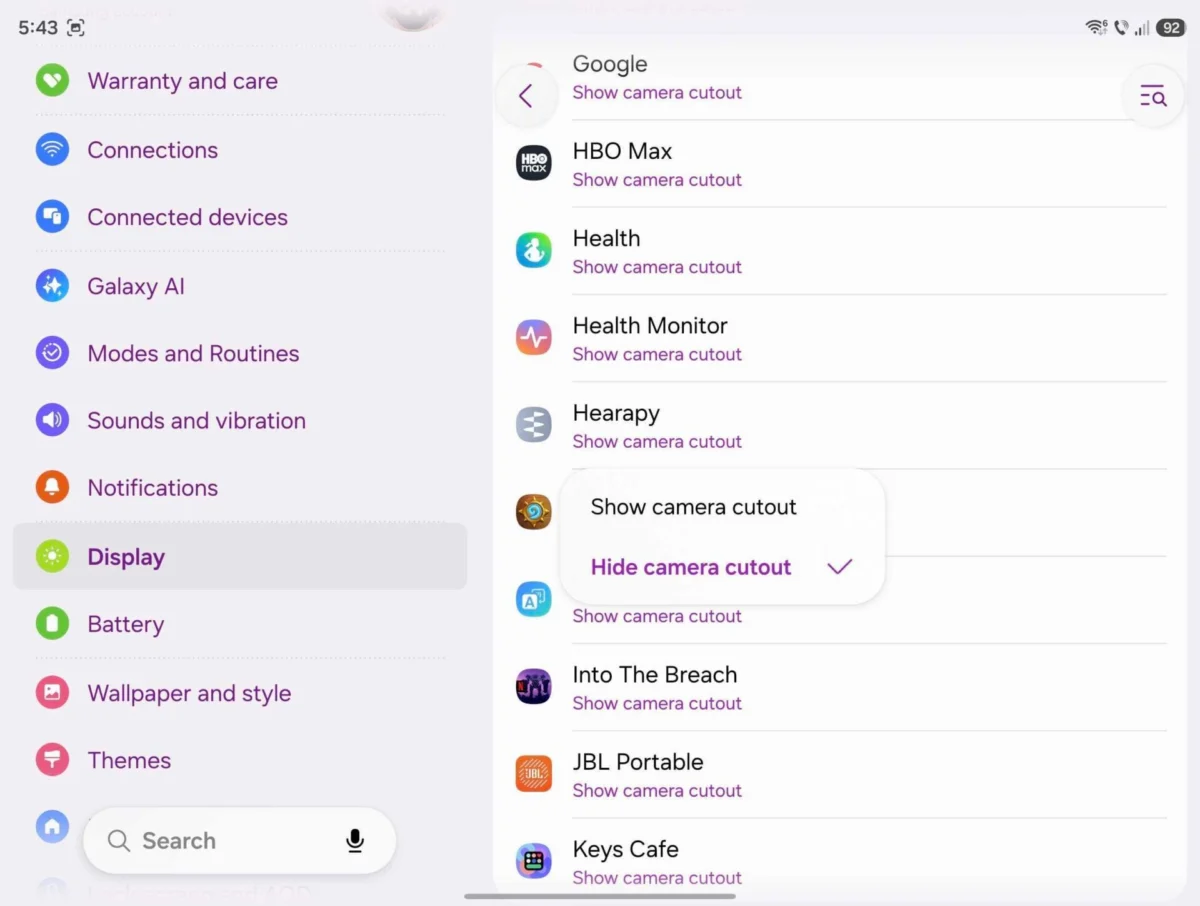
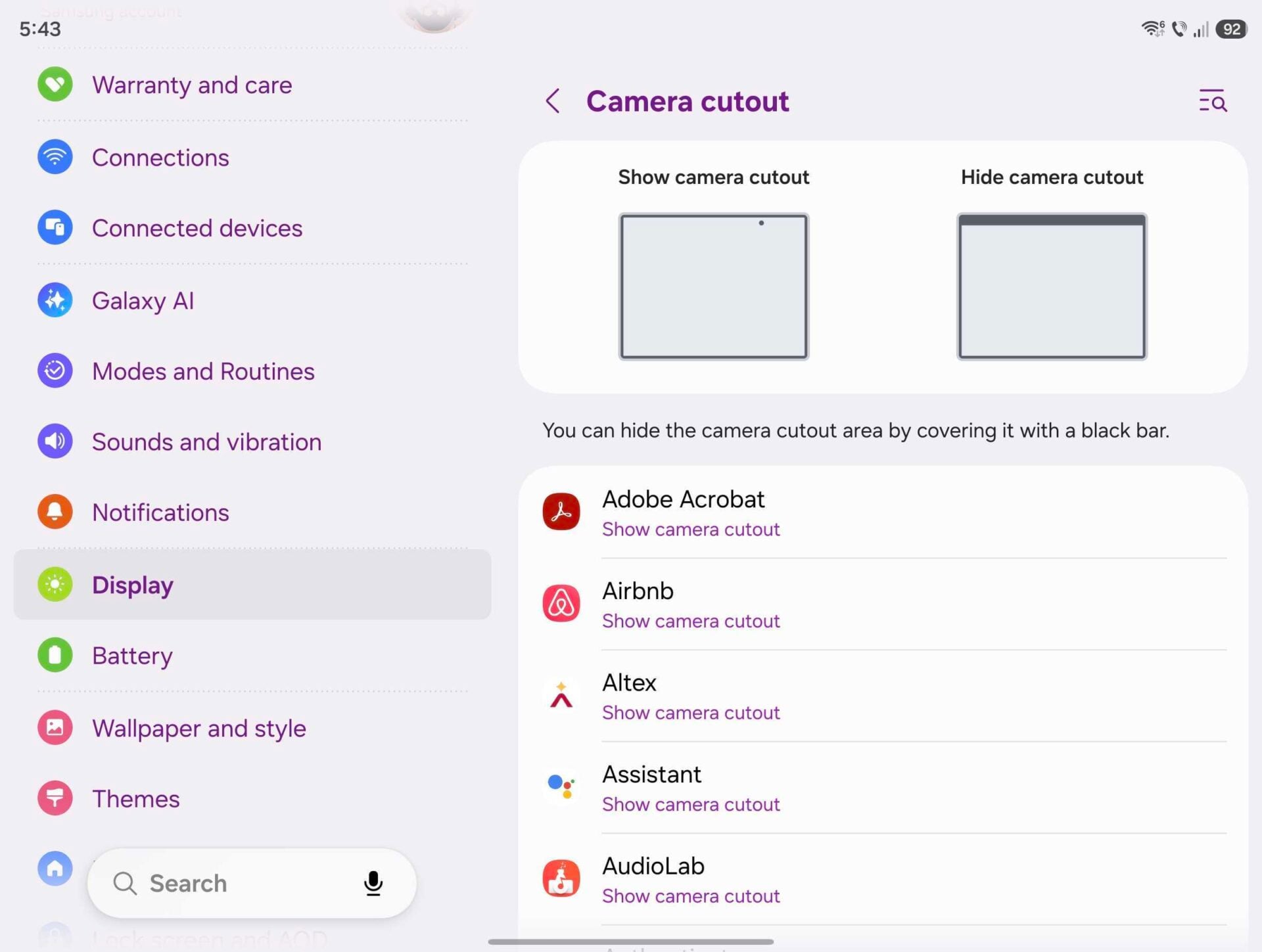
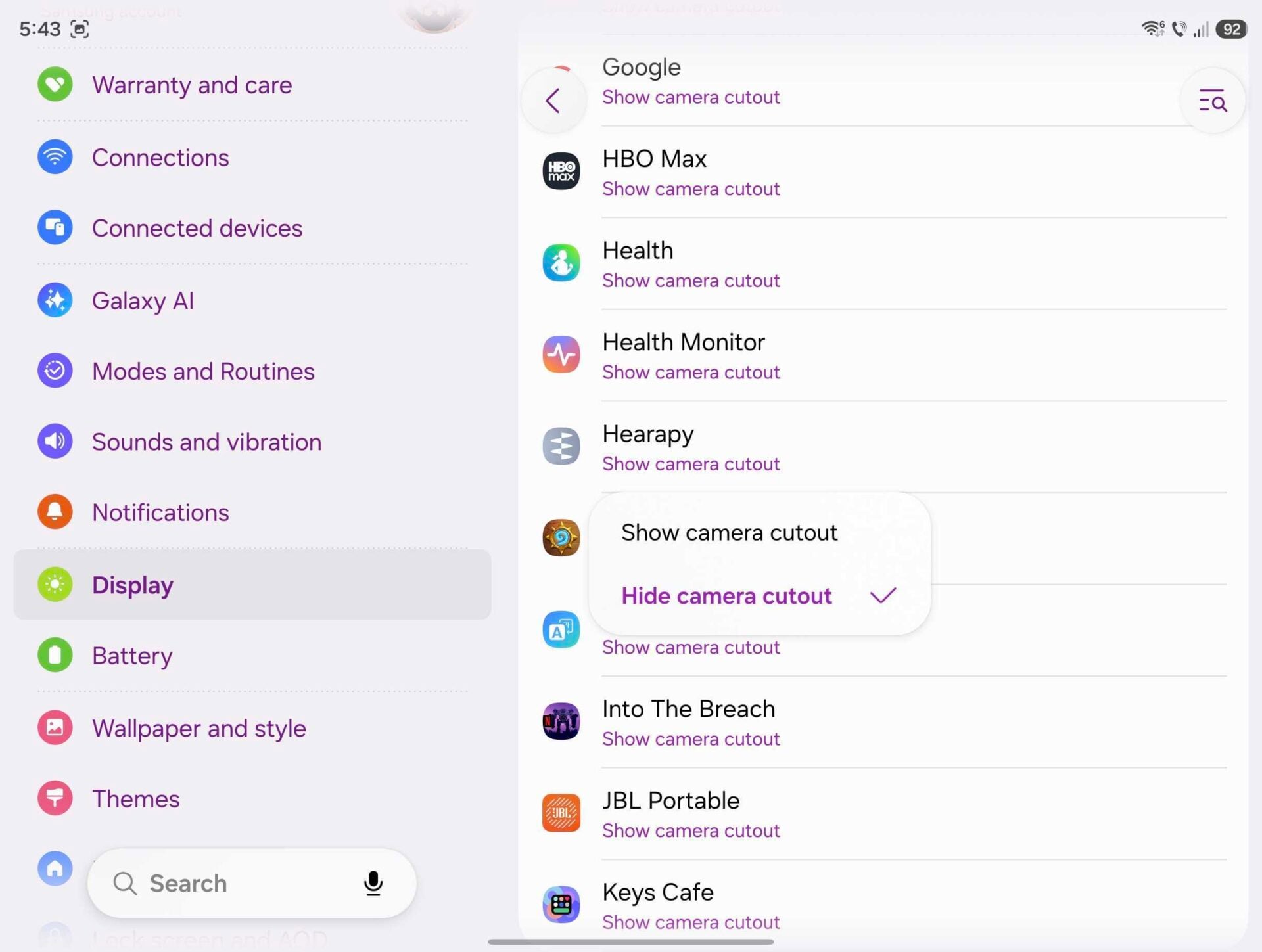
For users wishing to implement this change, the process is embedded within the "Full Screen Apps" settings. By navigating to the Display settings menu, users can access individual application settings.
- Accessing Display Settings: Navigate to the Settings application on the Galaxy Z Fold 8.
- Locating Full Screen Apps: Select the "Display" submenu, followed by "Full Screen Apps."
- App-Specific Customization: Within this menu, users can toggle settings for every application installed on the device. By selecting an application, one can choose to set the display mode to "Hide camera cutout."
- Implementation: Upon relaunching the selected application, the system dynamically shifts the app’s active interface area downward, effectively "blacking out" the rows of pixels occupied by the camera sensor.
This transformation creates a uniform black bar across the top of the display. While this technically reduces the total usable vertical resolution of the screen, the trade-off is a symmetrical viewing experience that eliminates the visual interruption of the punch-hole.
Implications for Content Consumption and Productivity
The decision to mask the camera cutout has notable implications for both media consumption and professional workflows. In the context of video playback, the black bar effectively mimics the letterboxing often seen in cinematic content, rendering the camera cutout invisible within the black border. For power users who utilize the Z Fold 8 for document editing or complex multitasking, the uniform top edge provides a more organized aesthetic, reducing eye fatigue during extended periods of focus.
However, it is important to note the objective trade-offs. By limiting the screen area, the user is essentially opting for a slightly lower effective resolution. Furthermore, because this is handled at the software level, the operating system ensures that the application UI does not "stretch" or distort to fill the gap. Instead, the app container is simply resized to fit the space below the status bar, maintaining the intended aspect ratio and touch targets of the original interface.
Industry Reactions and Future Outlook
While Samsung has not issued a formal statement regarding the "controversy" of the camera cutout, industry analysts note that the company’s software-first approach is a calculated move to bridge the gap between user preferences and hardware limitations. By providing a "soft" solution—a toggle in the settings—Samsung avoids the permanent hardware risks associated with under-display sensors, such as light refraction issues or sensor degradation.
Looking forward, the tech community anticipates that the Galaxy Z Fold 9 and subsequent models will likely push for more advanced Under-Display Camera (UDC) technology. As manufacturing yields for high-transparency panels increase and light-processing algorithms improve, the need for software-based masking may eventually disappear. Until that time, the flexibility provided by One UI remains a testament to Samsung’s commitment to user-centric design, ensuring that even the most discerning users can tailor their devices to their specific aesthetic and functional requirements.
Conclusion: Personalizing the Foldable Experience
The Galaxy Z Fold 8 is more than a piece of hardware; it is a platform for mobile computing. The ability to manipulate the camera cutout settings serves as a prime example of how modern software can mitigate the limitations of current-generation hardware. Whether one chooses to embrace the camera cutout as a sign of progress or mask it to achieve a sleek, uninterrupted aesthetic, the power remains firmly in the hands of the user. By experimenting with these settings, owners of the Z Fold 8 can ensure their device reflects their personal priorities, whether they value the utility of a front-facing camera or the pure visual immersion of an expansive, seamless display. As the foldable market continues to mature, it is likely that these granular customization features will remain a hallmark of the Samsung experience, setting a benchmark for how manufacturers should empower their user base in an era of rapid technological transition.
